
What you get
Your other computers show up under Network in the Fast Finder sidebar. Click one and you see its disk.
A small agent runs on each computer that you want to open from elsewhere. Fast Finder talks to it over your tailnet, the private network that Tailscale builds between your devices. You do not set up file sharing, open ports or type addresses.
What you need
- Fast Finder on each computer: a Mac with Apple silicon, or a PC with the Windows beta.
- The Tailscale app on each computer, signed in to the same Tailscale account.
Tailscale is optional. Everything on your own computer works without it.
Set up in two switches
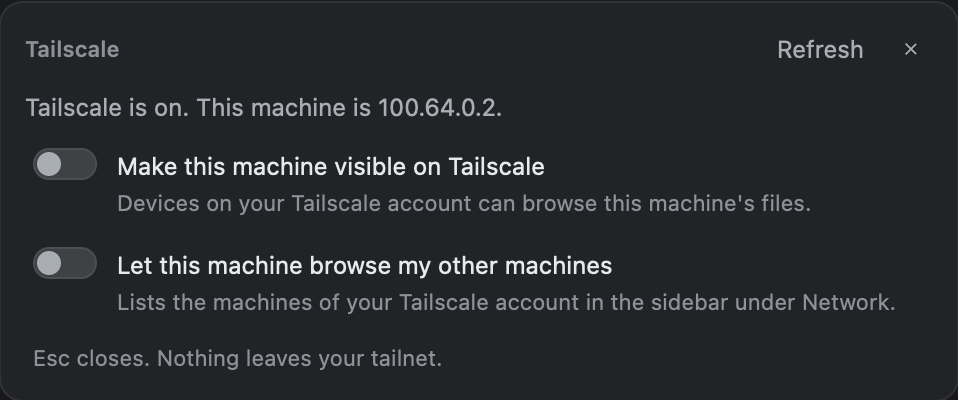
Open the Tailscale card in the sidebar, under Network. It has two switches.
- Make this machine visible on Tailscale. Turn this on for each computer that you want to open from elsewhere. It starts the Fast Finder agent at login. No admin password.
- Let this machine browse my other machines. Turn this on for the computer you sit at. Your other machines appear under Network in the sidebar.
When Fast Finder finds a machine for the first time, it asks what to do: Add to sidebar, Not now, or Never.
Browse, search, copy
- Browse another machine's folders in any view, in a tab or a second pane.
- Copy files between machines, in both directions.
- Search another machine. A Mac with the agent answers from its own index; other systems walk the folders.
A delete on another machine is permanent. It does not go to a Trash. An allowed login can read, change and delete anything that the agent's user can.
Security model
This is the whole model, in plain words.
- Tailnet address only. The agent listens on the computer's Tailscale IPv4 address, port 7797. It never listens on all addresses, and it refuses to start without a Tailscale address.
- Every request is checked. The caller must come from a Tailscale address. Then the agent asks
tailscale whoiswho it is. - Your login only. By default, only the login that owns the machine gets in. Tagged devices are refused. The
FAST_ALLOWsetting can add other logins. - Encrypted by Tailscale. Tailscale encrypts the connection with WireGuard. The agent adds no TLS of its own and keeps no shared secret.
Discovery is light. While the second switch is on, Fast Finder reads tailscale status every 30 seconds and sends one small info request to each online machine.
What it costs your computer
The agent waits for a connection and does nothing else. When idle it uses about 15 MB of memory and 0.0% CPU. It runs at low priority and has no timers.
Questions
Do I need Tailscale to use Fast Finder?
No. Tailscale is optional. Everything on your own computer works without it. You need Tailscale only to browse your other computers.
Can other people on my tailnet see my files?
Not by default. The agent checks every request with tailscale whois and lets in only the login that owns the machine. Tagged devices are refused. The FAST_ALLOW setting can add other logins.
Is the connection encrypted?
Yes. Tailscale encrypts the link between your machines. The agent adds no TLS of its own and keeps no shared secret.
Does the agent open a port to the internet?
No. It listens only on the computer's Tailscale address, port 7797. It never listens on all addresses, and it does not start without a Tailscale address.
What happens when I delete a file on another computer?
The file is deleted for good. A delete on another computer does not go to a Trash.
Is Fast Finder made by Tailscale?
No. Fast Finder is an independent app and is not affiliated with Tailscale Inc. It uses the Tailscale app that you install and sign in to.